
Ads ADS
» Audi A4 S4 RS4 RNS-E DVD navigation - 1 USD
» MC68HC05 Motorola 705 Programmer - 11 USD
» R270 BMW CAS4 BDM Programmer - 11 USD
» MT3500 Hand-Held Auto Engine Analyzer - 11 USD
» MaxiScan US703 Code Scanner Reader - 11 USD
» Renault Megane radio Navigation - 1 USD
» KESS OBD Tuning Kit - 11 USD
» MB880 OBD OBDII EOBD CAN BUS Auto Scanner - 11 USD
» Autel MaxiDAS DS708 updated by email - 11 USD
» AD900 Pro Key Programmer - 1 USD
ADS
KWP2000 Plus ECU REMAP Flasher » For sale
Price : 11 USD
021345678
 Details :
http://www.doucciauto.com/KWP2000-Plus-ECU-REMAP-Flasher-p-190.htmlContact Info:
Web: www.doucciauto.com
Email: sales@doucciauto.com
MSN: doucci@hotmail.com
KWP2000 Plus ECU REMAP Flasher
Function:
1.Read and analys your current ECU software.
B.Upgrad the ECU software with a re-mapped file.
C.Repair ECUs with software problems or corruption.
How do you use the KWP2000 PLUS?
1.You need a computer. Installing KWP2000 Plus software.
2.Connect USB cable to your PC;
3.Connect to your car via standard 16-pin OBD2 connector;
4.Supports high speed ECU flashing
5.Led indications for USB-power Car-power/rx/tx
6.Support KWP2000+ software and other KWP/ ISO software
How to Read and Write data?
Read and Write
1.Click read button to read out the original data
2.Click write button and select the file you want to write
3.Save the file to you HD, edit or forward it -Follow the instructions on screen
4.switch off ignition and wait 10 seconds
Package list:
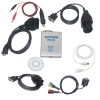
6 pc x Connect cables
1 pc x KWP2000+ Main unit
1 pc x Driver CD
021345678
http://www.doucciauto.com/KWP2000-Plus-ECU-REMAP-Flasher-p-190.htmlContact Info:
Web: www.doucciauto.com
Email: sales@doucciauto.com
MSN: doucci@hotmail.com
KWP2000 Plus ECU REMAP Flasher
Function:
1.Read and analys your current ECU software.
B.Upgrad the ECU software with a re-mapped file.
C.Repair ECUs with software problems or corruption.
How do you use the KWP2000 PLUS?
1.You need a computer. Installing KWP2000 Plus software.
2.Connect USB cable to your PC;
3.Connect to your car via standard 16-pin OBD2 connector;
4.Supports high speed ECU flashing
5.Led indications for USB-power Car-power/rx/tx
6.Support KWP2000+ software and other KWP/ ISO software
How to Read and Write data?
Read and Write
1.Click read button to read out the original data
2.Click write button and select the file you want to write
3.Save the file to you HD, edit or forward it -Follow the instructions on screen
4.switch off ignition and wait 10 seconds
Package list:
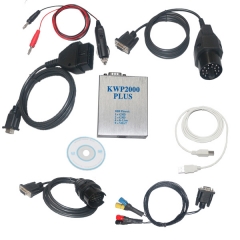
6 pc x Connect cables
1 pc x KWP2000+ Main unit
1 pc x Driver CD